
Cost · GPU · Training speed
Two fighters and vision: GPU against CPU, optimised
Training cost about $6.7016 rented RTX 5090 machines on vast.ai and 8 EC2 spot CPU runs, about 5.3 machine-hours, 22–23 October 2026 · breakdown
Training on a rented GPU compared nine GPUs against EC2 spot machines on the first skill the fighter learnt: standing in the stance while being shoved. A rented card came out about 4.5 times cheaper. Since then the training has moved on to blocking an opponent, a much heavier job. Tony Yum, the coach:
We’ve already done an analysis on various GPU on stance and balance, but now we have a more complex model with two fighters and vision, so we want to redo the analysis. But just to reduce the scope of the GPU choices, we’ve just chosen RTX 5090 because that’s proven to be the most effective in the last training. But now we’re going to keep optimizing both the CPU usage on EC2 spots versus the RTX GPU and see how far we go, and again test the price and speed comparison between CPU and GPU.
So this post compares one GPU, the RTX 5090 rented on vast.ai, against one CPU machine, a 96-vCPU EC2 spot machine. It measures both as they were, optimises each until there was little left to gain, and compares them again. As before, the models trained here were thrown away.
What makes this training heavier
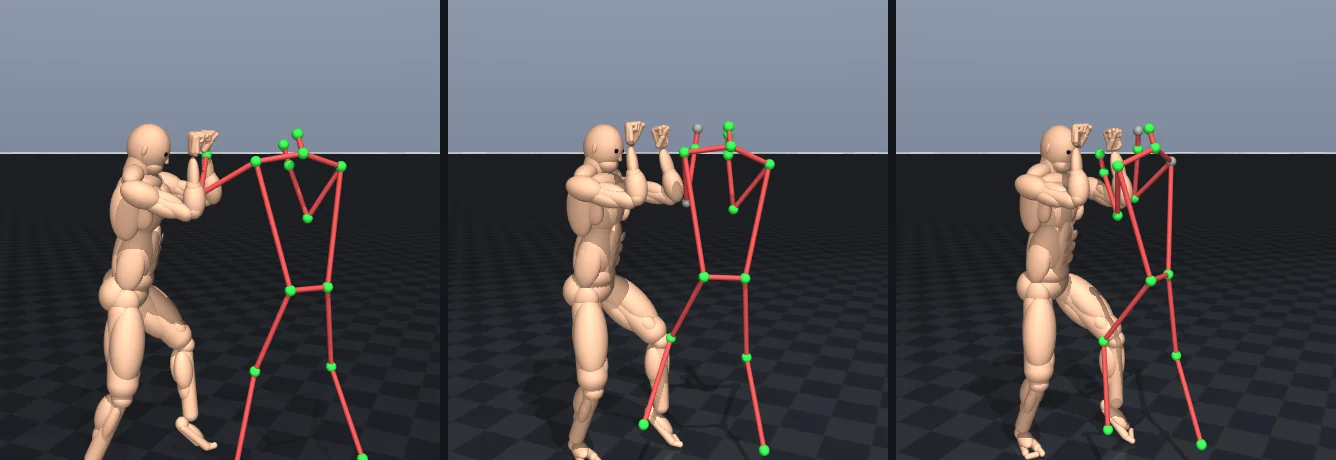
The stance test trained one body and one network. The blocking training (the environment from the blocking post, now with every skill mixed in) has much more in every step:
- Two fighters. Ours, the muscular body, and an opponent who throws recorded punches at it.
- Vision. The fighter doesn’t get the opponent’s position for free. It sees his keypoints from its own eyes: 32 rays cast to the points of his body, and any point behind its own gloves is hidden (occlusion), with a tenth of a second of delay.
- The punch’s score. When a punch arrives, 19 paths from the glove to the head say how much of it got through the guard.
- Everything mixed. Some episodes face the opponent; the rest are blocks on command, walking to a spot, punches at a bag, or recovering from shoves. Each block press fits the arms to a pose with inverse kinematics.
- A second network. The walking model from earlier posts runs beside the policy as a teacher, pulling its legs toward a good walk (policy distillation).
The test
Both machines start from the same model (guard5, the current best blocker) with the same settings as real training, and train for 15 minutes.
The unit of work is one training iteration of PPO: collect about 30,000 steps from many copies of the world at once (parallel environments), then update the network on them, four passes in minibatches of 2,048. The stance test showed that how fast the fighter learns is set by the number of iterations, not the number of steps. So the speed here is seconds per iteration, and the cost dollars per 1,000 iterations.
- CPU: a 96-vCPU EC2 spot machine with 72 worker processes, each stepping 6 copies of the world for 64 steps (27,648 steps an iteration), and two learner processes of 12 threads updating the network.
- GPU: an RTX 5090 stepping 2,048 copies at once for 16 steps (32,768 steps), all of it, physics and network, on the card with MuJoCo Warp.
| EC2 96 vCPU spot | RTX 5090, vast.ai | |
|---|---|---|
| price | $1.48/h (c8a), $2.58/h (m8a, the one available) | $0.67/h |
| seconds per iteration | 1.90 | 2.00 |
| steps per second | 14,600 | 16,300 |
| $ per 1,000 iterations | 0.78 (c8a), 1.36 (m8a) | 0.37 |
Unoptimised, the two took the same time, and the GPU was 2.1 times cheaper. On the stance it had been 4.5 times. Two fighters and vision narrowed the gap.
How busy was the CPU?
Tony’s first question once the numbers were in: “How well optimised is the CPU? I.e. what CPU utilisation is it?”
About three quarters. The trainer’s profile splits every iteration in two. The workers collect the next batch while the learners update on the last one (decoupled PPO), so an iteration takes as long as the slower of the two.
- The learners’ update took 1.90 s, the whole iteration. They were the bottleneck.
- The 72 workers stepped the physics for 1.34 s and then waited 0.56 s for the learners, idle 30 % of the time.
So 24 of the 96 vCPUs were always busy and 72 were busy 70 % of the time: about 77 % in all.
Optimising the GPU
Where the step went. The profile of one step with 2,048 copies counted 13,700 kernels, the small programs the GPU runs. About 1,800 were MuJoCo Warp’s physics, rays and arm fitting. The other 11,700 were tiny arithmetic kernels from the rewards, observations and resets, written line by line in PyTorch. Each did almost no work, and each had a fixed start-up cost. The GPU spent much of the step waiting between them.
Fusing them. torch.compile reads that PyTorch code and merges chains of small operations into a few bigger kernels (kernel fusion). The physics calls were kept out of it and run as before. A step with 2,048 copies went from 79.5 to 60.2 ms (Figure 2).
Two things had to be fixed on the way. The compiled code at first came out in pieces, because some table offsets were numpy integers, which the compiler traced as data instead of constants. Then some outputs came out in 64-bit instead of 32-bit (floating point): the project’s settings are numpy numbers like the 4-degree tolerance np.radians(4.0), and the compiler turned them into 64-bit arrays where plain PyTorch treats them as ordinary numbers. The step’s outputs are now converted back to 32-bit. Against the uncompiled step from the same start and the same actions, the rewards matched to 3 in 100,000 for the first steps, and then drifted apart the way any two 32-bit runs of contact physics do, with the same averages.
The update as one recording. The network update was the other 0.53 s of the iteration. Run as written, its hundreds of small kernels are sent one by one by the host’s CPU, and most rented 5090s sit behind slow server processors: the same update took 0.13 s on a box with a fast desktop processor and about 0.5 s on the usual EPYC servers. Recording one minibatch step once and replaying it (a CUDA graph) takes the CPU out: 0.08 s.
That recording already existed but had been switched off, because the first rollout after it crashed the GPU with an illegal memory access, on every vast.ai box. A test with the same pieces didn’t crash, and adding the trainer’s extras back one by one didn’t either. What did work: recording the update before the environment’s own recording, not after. Two runs of 538 and 792 iterations ran clean. The underlying cause is still unknown; most likely the two recordings’ memory.
The result: 1.19 s an iteration, 27,500 steps a second, against 2.00 s. The environment step is now 1.09 s of that and the update 0.08. A 20-minute run on an ordinary EPYC-hosted 5090 matched the baseline’s training figures iteration by iteration: the same returns, falls, punches, goals, blocks and opponent passes. Only the time changed.
Optimising the CPU
The learners. At 12 threads, one learner’s update runs at about 1 TFLOPS, about half the cores’ theoretical peak, which is typical for networks this small. Six ways of splitting the 96 vCPUs between workers and learners were tried: one learner with 24 threads, two with 8, 12 or 16, three with 8 or 12. Most barely moved the iteration. The best was 60 workers with 7 copies each and three learners of 12 threads: 1.91 to 1.74 s an iteration on the same machine, 9 % faster.
More learners would lose. Each extra learner process adds to the all-reduce, the step where the processes add up their gradients so every copy of the network stays the same, and with three it already took 0.38 s an iteration.
Fewer bits. Running the network’s passes in bfloat16, 16-bit numbers that the AMD processor multiplies faster, nearly halved the update: 0.88 to 0.48 s at 12 threads. The iteration went to 1.43 s, 25 % faster than at the start. It changes the numbers slightly, and it hasn’t been checked yet that a policy trained this way learns as well, so it is listed separately below.
The workers. One copy of the environment took 4.4 ms a step, of which MuJoCo itself was about 1.6 ms. The rest was the project’s own Python and numpy around it: numbers clipped one at a time, arrays joined with slow helpers, table lookups. Rewriting the worst of it made one environment about 20 % faster, with every observation and reward identical to the last bit over 6,000 steps. On the 96-vCPU machine, where 72 processes share the memory, it saved 7–11 % of the workers’ time. But the learners still set the pace, so on its own it didn’t shorten the iteration.
The machine. The same work on an Intel c8i machine took 1.45 times as long in the physics as on AMD’s c8a or m8a, which have a whole core per vCPU. The AMD machines are the ones to use.
Keeping the comparison fair
Midway through, the GPU’s training figures changed: about 200 blocks an iteration instead of 1,150, and far fewer punches. It looked like the compiled code was broken. It wasn’t: the same trainer without compiling showed the same drop. That morning, separate work on kicks had widened the range of the fighter’s ankles, and every reference motion had been rebuilt for the new body. With the old ankles shipped to the machine, the blocks came back.
So the final numbers use the same body as the first test, on both machines, and the CPU’s before and after ran back to back on one machine.
Optimised: the comparison
| CPU, 32-bit | CPU, bfloat16 (marked) | RTX 5090 | |
|---|---|---|---|
| seconds per iteration | 1.91 → 1.74 | 1.43 | 2.00 → 1.19 |
| steps per second | 14,500 → 15,300 | 17,800 | 16,300 → 27,500 |
| $ per 1,000 iterations | 0.78 → 0.71 | 0.59 | 0.37 → 0.22 |
| $ per million steps | 0.027 | 0.023 | 0.0068 |
| paid set-up before training | about 2 min | about 2 min | about 10 min (~$0.11) |
CPU prices at c8a spot ($1.48/h), the cheapest 96-vCPU AMD machine; the measurements are from an m8a with the same processor. GPU at $0.67/h.
What it shows:
- The RTX 5090 is now about 3.2 times cheaper per iteration than the best 32-bit setup on EC2, and faster: 1.19 s an iteration against 1.74. Against bfloat16 learners on the CPU it is 2.7 times cheaper. Per step, about four times.
- The GPU gained more from optimising: 41 % off the iteration against 9 % (25 % with bfloat16). Its waste was in starting work (thousands of tiny kernels, a CPU sending them one by one), and that can be removed. The CPU’s learner was already doing its arithmetic at a fair rate.
- The cheapest 5090s should now be as good as any. With the update recorded, the CPU next to the card only replays recordings, so a $0.60–0.67 server box should run as fast as a $0.91 one with a fast desktop processor. The final run, on an old EPYC server, reached 1.19 s.
- The GPU costs more to start: about 10 minutes from renting to the first iteration in these runs (booting, rebuilding the reference tables, compiling the physics and then the fused kernels), about 11 cents. For runs of an hour or more it hardly matters.
What Coach Tony thinks
Tony framed this one as a follow-up rather than a new survey: keep the GPU choice to the RTX 5090, “proven to be the most effective in the last training”, and “keep optimizing both the CPU usage on EC2 spots versus the RTX GPU and see how far we go”. When the first comparison came back, his question was about the CPU side, how much of the machine was actually being used, and his instruction afterwards was to keep optimising both “until you think there is pretty well optimised”, then see how cost and speed compare.
What’s next
- The GPU’s step. About half of the 1.09 s is MuJoCo Warp’s own physics, the rest the environment’s kernels and a reset that runs on every copy every step. More copies cost little more time (4,096 take 99 ms a step against 60 ms for 2,048), so 4,096 copies for 8 steps would make the same batch in about 0.8 s. That shortens each copy’s run between updates, which changes the learning, so it needs a learning test first.
- The start-up. The compiling could be kept between machines instead of redone each time.
- bfloat16 on the CPU would need a learning test before it is used, but with the GPU this far ahead, the CPU is now the backup.
What it cost
Most of the money went on short GPU and CPU runs to measure each change, and on chasing the GPU crash. The vast.ai figures come from each machine’s billed time and hourly price; the EC2 figures are estimates from each run’s length and the zone’s spot price.
| item | machines | machine-hours | cost |
|---|---|---|---|
| the first comparison: 15 minutes on each | 1 RTX 5090, 1 EC2 m8a.24xlarge | about 0.7 | about $1.06 |
| GPU optimising: benchmarks, the crash hunt, test and final runs | 15 RTX 5090 (two never answered) | about 3.2 | about $2.65 |
| CPU optimising: benchmarks and the final comparison | 7 EC2 spot (c8i, c7a, c8a, m8a, 96 vCPU) | about 1.4 | about $3.00 |
| total | 24 | about 5.3 | about $6.70 |